FastUnlock: limited code execution through Narrator at the lock screen
FastUnlock uses physical access and Narrator to run code in a limited WSIAccount context at the Windows lock screen. It does not break BitLocker; status and mitigations.
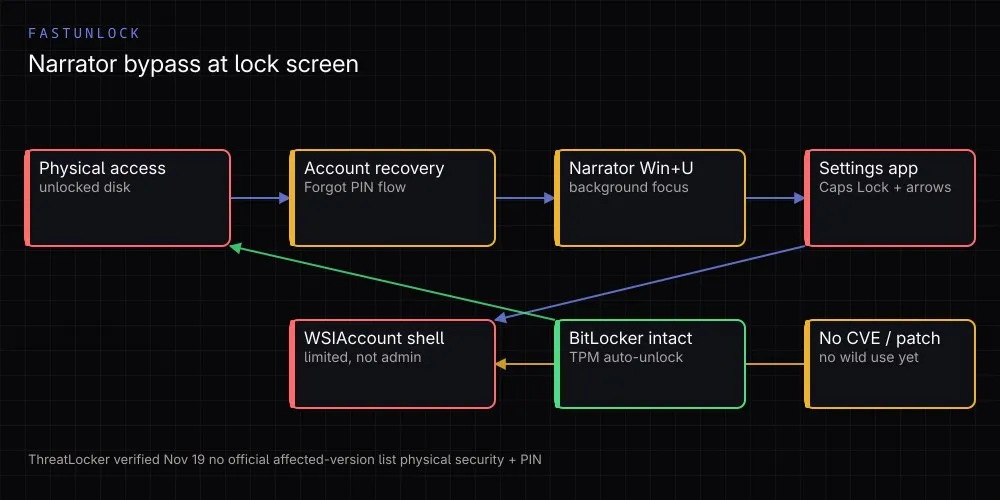
On November 19, 2026, a researcher using the handles Chaotic Eclipse / MSNightmare / Nightmare Eclipse published FastUnlock, a Windows lock-screen bypass technique. ThreatLocker Threat Intelligence tested it the same day and confirmed it works: someone with physical access can run code in a limited account context without signing in.
This is not a remote exploit and not password cracking. The lock screen is bypassed through Windows’ own accessibility tool and account-recovery flow. Microsoft has published no patch or advisory, there is no public CVE record, and there is no evidence of real-world abuse.
Quick summary
| Field | Known status |
|---|---|
| Name | FastUnlock, Windows Narrator lock-screen bypass |
| Discovery / disclosure | November 19, 2026, researcher’s GitHub repository |
| Independent verification | ThreatLocker, tested the same day on November 19, 2026 |
| Prerequisites | Physical access; a Microsoft account reachable through lock-screen recovery |
| Method | Built-in Narrator screen reader used to navigate the lock-screen UI |
| Account obtained | WSIAccount; not an administrator |
| Fix | None; no Microsoft advisory or CVE record |
| Exploitation evidence | No reports of use in the wild |
| BitLocker | Encryption not broken, keys not recovered; TPM auto-unlock has already opened the disk |
1. Separating the primary claim from independent testing
The first description of the technique is in the researcher’s GitHub repository. That is the primary source for the claim, but it is a short post plus a video. The researcher says the bug lies in how Narrator handles UI in a locked-account context and that successful exploitation runs code as WsiAccount, the account that hosts the lock screen.
ThreatLocker’s November 19 write-up describes the independent test and is the clearest technical source. ThreatLocker confirmed that the lock screen can be navigated into the Settings app and that a program can be run as the WSIAccount user. The company explicitly says this account is not an administrator.
Secondary outlets such as The Hacker News and Security Affairs repeat the researcher’s handles and disclosure timeline. They are useful for tracking coverage, but the technical basis remains the GitHub repository and the ThreatLocker test.
2. How the chain works
ThreatLocker lists short prerequisites:
- Physical access to the machine.
- A Microsoft account available through the account-recovery flow.
- Narrator navigation using Caps Lock and the arrow keys.
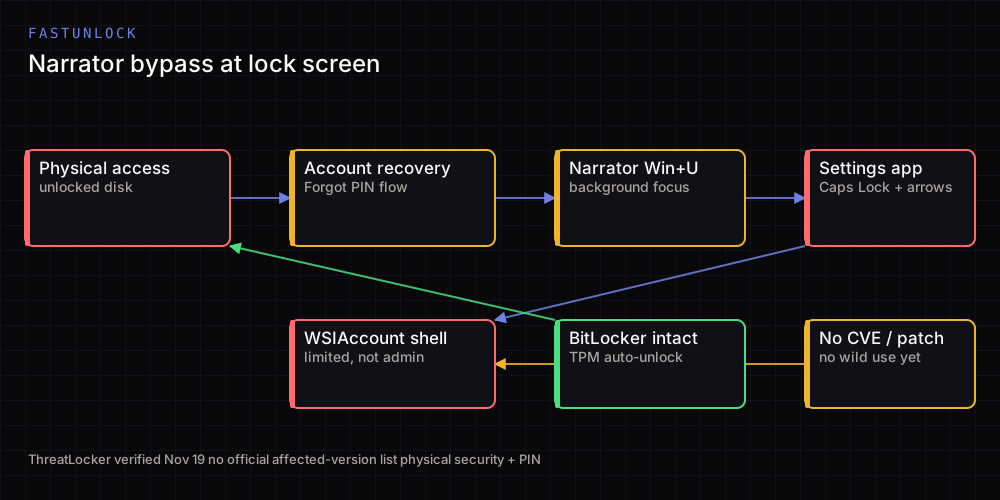
The flow starts with the “I forgot my PIN” or password-reset prompt on the lock screen. From the Microsoft account recovery screen, Win+U opens the built-in screen reader, Narrator. According to the researcher, Narrator focuses on a background window that should not be visible, and Caps Lock plus arrow keys and Enter lead from there into Settings.
In its test, ThreatLocker found it could not type with the physical keyboard while navigating through Narrator, but the on-screen keyboard could be opened when typing was needed. How code gets onto the machine varies; the test used an external drive, and the researcher describes a USB-based execution path.
So “one keystroke takes over the PC” is inaccurate. The chain combines a recovery flow, a screen-reader focus bug and the low-privilege lock-screen account context.
3. The privilege boundary: WSIAccount is not admin
This is the most commonly confused point. The account reached in ThreatLocker’s test is WSIAccount, the limited account Windows uses to host the lock screen. It is not an administrator, so the technique does not directly grant domain admin or SYSTEM privileges.
A limited account is still a real risk. Running code at the lock screen, before sign-in, gives an attacker a starting point to touch local data or leave something behind for the next session. Windows’ lock-screen security model is designed precisely to prevent that kind of access.
Some secondary reports suggest a new administrator account can be created under certain conditions. That goes beyond ThreatLocker’s test and should be treated as secondary and unverified.
4. Why BitLocker does not stop it
Many Windows devices use BitLocker with TPM, which unlocks the drive automatically at boot. By the time the lock screen appears, the drive is already unlocked and files are readable. FastUnlock operates at exactly that point.
This does not break BitLocker encryption. The technique does not recover the recovery key or the encryption key; it bypasses the lock-screen layer on a system whose disk is already open. A “BitLocker broken” headline is therefore wrong.
Devices with a pre-boot PIN are different: if the machine is powered off or hibernated, the PIN is requested before the drive unlocks and Windows starts. That is ThreatLocker’s point as well. A PIN does not protect a machine that is already running at the lock screen.
5. Scope and open questions
The researcher says the technique was tested on Windows 11 26H2 with the November 2026 updates and was consistent across the machines tested. The researcher also says Windows 10 was not tested.
There is no official list of affected Windows versions. It is therefore wrong to say “all Windows versions are affected” or “only 26H2 is affected.” Any machine meeting the stated conditions should be treated as potentially affected until Microsoft publishes guidance.
The researcher’s demo video stops short of the final USB execution step; the researcher says a flash drive was not available. That means the first part of the chain is demonstrated while the last step relies on the researcher’s account of it. ThreatLocker’s independent test partly closes that gap.
6. What to do
- Reduce physical access. Laptops, shared desks and front-counter machines should not be left where a stranger can reach them.
- Do not treat a locked screen as a full boundary. A device someone else can physically hold should be considered at risk.
- Review recovery options. Audit lock-screen Microsoft account recovery flows and MDM settings you control.
- Consider a BitLocker PIN. Especially for mobile devices, a pre-boot PIN protects a powered-off machine where TPM-only auto-unlock would not.
- Shut down or hibernate. When a device leaves your control, shutdown or hibernation is safer than leaving it at the lock screen.
- Manage accessibility tooling through policy. Blocking Narrator on managed devices that do not need it can reduce exposure, but do not cut off users who rely on a screen reader.
- Watch for Microsoft guidance. There is no fix yet; verify any future advisory before saying otherwise.
7. What not to write
- “BitLocker is broken” — keys are not recovered; the disk is already unlocked.
- “Remote zero-click RCE” — physical access is required.
- “Administrator privileges obtained” — ThreatLocker describes a limited WSIAccount.
- “In KEV and actively exploited” — no CVE, no KEV entry, no evidence of in-the-wild use.
- “Microsoft shipped a patch” — no official fix exists at the time of writing.
- “Every Windows device is affected” — no official affected-version list exists and not every machine meets the conditions.
Status
As of November 20, 2026, FastUnlock is an independently verified but unpatched physical-access technique. Risk depends on whether an attacker can reach the device and whether a Microsoft account is available through lock-screen recovery. The practical mitigations are physical security, device policy and a BitLocker PIN where appropriate.
From this series
- WhatsApp iOS flaw: the cleartext Noise key claim in cck.dat
- Why does everything become 2shell?
- Ruby2Shell: case-conversion overflow